

Purchase Your Dye Sublimation Printer Bundle With Added Value, From HobbyPrint®
When you buy a sublimation printer bundle from HobbyPrint®, we want you to enjoy using the printer within your hobby to its fullest capabilities. Our added value and support are there to offer you peace of mind, that you have someone with you to support you in using the product and someone there if you need help.
Download links:
Link to Epson Support page to navigate to Printer Driver downloads: Go to Epson Support Page
How To Locate and Download the Printer Drivers:
- Scroll down the Epson support page to the "Search by Product Name" search box and type in your printer model.
- A link will appear under the search box with your full printer model name in Blue.
- Click this link, and it will take you to the downloads page for your printer model
- Select either the "Epson Product Setup" from the "Product Setup+" link or select the Drivers individually from the "Drivers+" link
- Download the chosen drivers and then double-click the download and follow the onscreen instructions
- See Video Example here: https://www.youtube.com/watch?v=Zqw7vGnvr4c
HobbyPrint® Club Discount Offers
Register for an account on hobbyprint.co.uk, which will entitle you to lower prices. We give our registered customers a 5% discount on all consumables and media products. We also issue monthly specials with further savings on consumable items. We aim to be more cost-effective for our customers than the online marketplace sites.
Support Contact Points:
- Email Address: info@hobbyprint.co.uk
- Telephone Numbers: 01430 284112
- Request a Tutorial: info@hobbyprint.co.uk
Coming Soon, (We are working on it!)
As well as creating in-house "how-to" videos, HobbyPrint® also has a fully working, online TV broadcasting studio. We aim to put together tutorials and offers shows that will help our customers save money on our products and help customers better understand how to use the products. A feature of the shows will be live customer interaction with live demonstrations based on customer requests. All shows will be informal and low-key.
Why Use an Epson printer for sublimation printing
Understanding sublimation printers and what they are can be a little tricky. Here, we have tried to simplify the subject by breaking down the key points in order for our customers to better understand what they are buying. We are aware of some of the crazy explanations on the internet, including listings of printer brands that will not work as a sublimation printer.
Understanding why HobbyPrint® use Epson printers for printing sublimation inks requires a basic understanding of what sublimation ink is and how it works. In simple terms, sublimation ink has inert particles within the ink that can only become active after heat is applied to the ink. This is why a heat press is required to transfer an image or design from sublimation transfer paper.
What happens when heat is applied to the ink
When heat is applied to a printed design on transfer paper, the ink is converted to a gaseous state. The design is transferred into a sublimation coating, for instance, the coating on a mug, and it reforms into a solid state as it cools.
If heat is applied to sublimation ink as it prints, the sublimation process would start in the printer and on the transfer paper. It would block printheads quite quickly, and any activated ink on the transfer paper would be unusable.
Why Use Epson Printers for Sublimation Printing
Epson printers use vibrations to push ink through their Micro Piezo print heads; they do not use heat. They sell this as heat-free print technology. Several other printer manufacturers use Epson's Micro Piezo printheads in the manufacture of their own branded printers. HP and Canon printers use heat to boil the ink and push the heated ink through their print heads. These printers will not work as sublimation printers.
Any Epson desktop inkjet printer can be considered a sublimation-capable printer. - No heat is used in the print process.
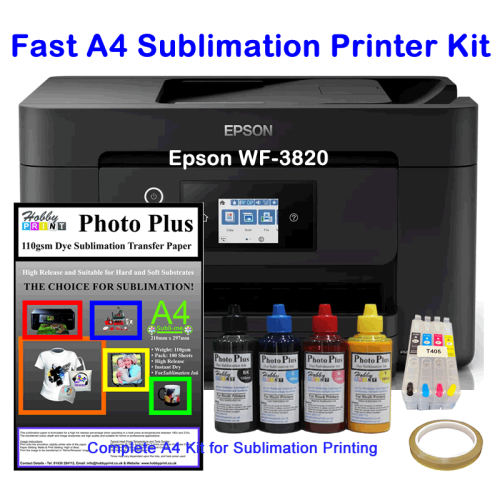
Fast A4 Sublimation Printer Bundle - WF-3820 with HobbyPrint® Sublimation Kit.
Create personalised and unique gifts with this A4 multi-function sublimation printer bundle from HobbyPrint®
The Epson WF-3820 creates a fast and highly productive A4 Multi-function printer for sublimation printing when combined with a HobbyPrint® sublimation accessory kit. By expertly pairing the printer with the sublimation accessory kit, this sublimation printer is ideal for printing high-resolution images for T-shirts, Mugs and other gifts. The configuration of the black and colour printing nozzles produces fast printing speeds.
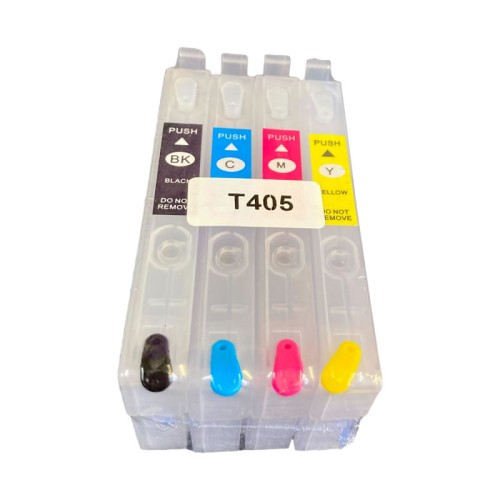
This fast A4 multifunction sublimation printer bundle, with HobbyPrint's "PhotoPlus" sublimation inks and sublimation transfer papers, produces vivid, high-resolution output for personalised products such as mugs, T-shirts, caps, and other custom gifts. The printer, combined with the HobbyPrint® accessory kit, has everything needed to get you up and running with sublimation printing quickly and easily — no special modifications required. The 20ml refillable cartridges are high-capacity cartridges offering many prints and high-productivity between cartridge refilling.
With a front-loading paper tray and a single-sheet rear feed, the WF-3820 can load and handle paper formats from A5 to A4 with ease. Custom print sizes can also be handled for Pre-Cut Mug wraps and other formats. Additionally, multiple connectivity options, including USB, Wi-Fi, and Ethernet, along with Scan, Copy & Print functionality, make it a flexible solution for both home and business setups.
The printer is a scanner, copy and printer with no modifications made, or required to be made for sublimation printing. The printer will use refillable cartridges with sublimation ink instead of the manufacturer's ink cartridges. The conversion kit supplies all items required to get you sublimation printing quickly.
Mobile Device Printing - The WF-3820 supports mobile device printing through Epson apps; however, using mobile devices for specialised printing can restrict the full capabilities that the printer offers. We recommend that the printer be used with a computer or laptop for sublimation printing.
Included in the bundle
- Epson WF-3820DTWF Printer – complete with discs and manuals
- Empty 405XL Refillable Ink Cartridges
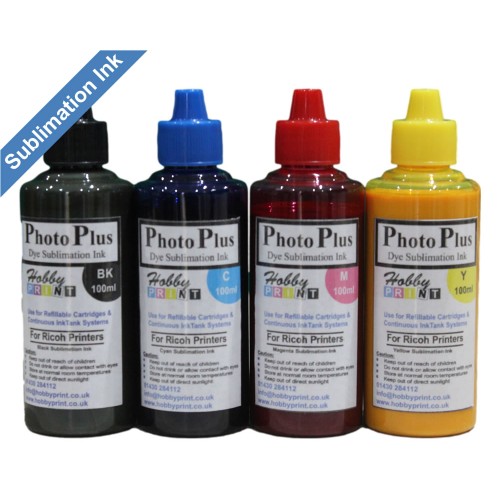
- 400ml HobbyPrint® Dye Sublimation Ink – 4 x 100ml bottles (Black, Cyan, Magenta, Yellow)
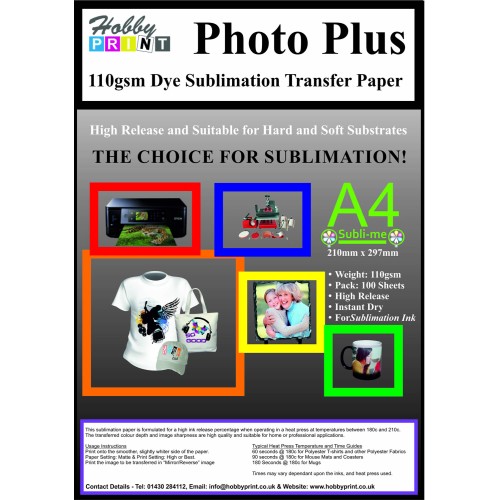
- 100 sheets of A4 Sublimation Paper
- Roll of Heat-Resistant Tape – for positioning transfers before pressing
All backed by HobbyPrint®’s renowned customer support — “We will not be beaten on customer support” — with tutorials, direct help via phone, email or video chat, and real customer testimonials showcasing the help customers receive.
Whether you’re into crafting, a hobbyist, small business, or enthusiast, this bundle offers excellent value, premium results, and the confidence that support is always there when you need it.
Key Features & Benefits
- Complete A4 Sublimation Bundle – includes printer, refillable cartridges, sublimation inks, papers, and accessories.
- Fast & High-Quality Printing – print detailed designs quickly with Epson PrecisionCore® technology.
- Multi-Function Convenience – print, scan, and copy with ease, including "Copy/Scan to Print"
- Front-Loading Tray and a single sheet rear feed – Load and print from A5 print up to A3+ size. Custom print sizes is supported.
- Easy Conversion – no printer modification required; simply install the refillable cartridges and start sublimation printing.
- High-Capacity 20ml Cartridges – enjoy long print runs and fewer refills.
- HobbyPrint® "PhotoPlus inks and transfer papers – Print high-quality designs with high-quality transfers
- Connectivity Options – USB, Wi-Fi, and Ethernet connections for flexible printing.
- Mobile Printing Support – compatible with mobile devices (PC or laptop recommended for best results).
How to Use
- Print your mirrored design onto the supplied sublimation transfer paper.
- Use a heat press to apply heat and pressure to your chosen item.
- Transfer the design onto polyester fabrics or sublimation-coated products such as ceramics, aluminium panels, and MDF.
⚠️ Please Note: Fabrics must be polyester or poly-coated. Ceramics, wood, and metal blanks must be sublimation-coated. Regular mugs and untreated items will not work.
HobbyPrint® Support & Online Training
Usage instructions are included along with our contact details - if you need assistance. We are product knowledgeable and offer support using telephone and messaging services, including video chat and Zoom. We also produce and broadcast video tutorials on "how to use" HobbyPrint® supplied products. - Ask about our sublimation training sessions!
At HobbyPrint®, customer support sets us apart. We commit to unbeatable customer assistance. See our customer testimonials and feedback to understand why buyers trust our support — because we’re with you every step of the way.
Give us a call - We love to talk!
Thinking of buying? Call us on 01430 284112 for expert advice before purchase.
Speak directly with a HobbyPrint® product specialist and get peace of mind from a real and knowledgeable person, who answers the telephone.
Fast A4 Sublimation Printer Bundle - WF-3820 with HobbyPrint® Sublimation Kit.
- Brand: HobbyPrint®
- Product Code: PR-DS-EP-WF-3820-APK
- Availability: 8
-
£258.00
- Ex Tax: £215.00
Tags: dye, sublimation, printer, bundle, epson, wf-7310dwf, printing, accessory, kit